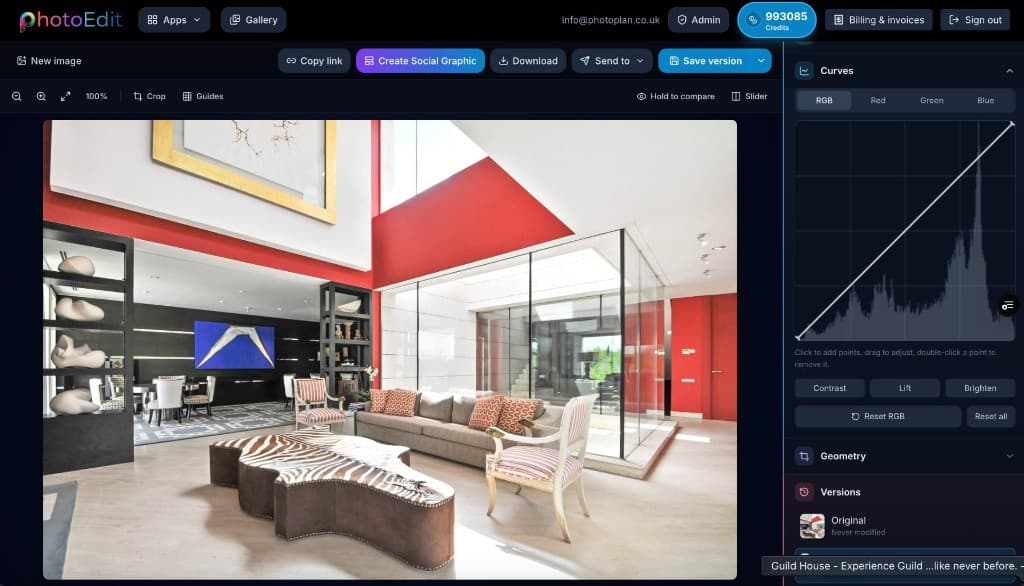
PhotoEdit Studio covers free manual edits — crop, straighten, exposure, colour, Spotlight, background removal and social graphics — plus PhotoClear decluttering and sky tools in the same editor. Those AI tools use ReHub credits.
PhotoEdit Studio lets you crop, straighten, resize and adjust exposure, colour, shadows and highlights for free with an account. The PhotoClear tab in the same editor adds decluttering and sky tools, which use ReHub credits. Spotlight, background removal and still social graphics are free.
The toolkit
Editing tools, explained
Free manual tools, plus PhotoClear decluttering and sky replacement in the same editor. Credits apply only to the optional AI actions.
Crop
Reframe a shot and crop to portal-friendly ratios so the property fills the frame.
Straighten
Level crooked horizons and fix leaning verticals with a single, simple control.
Exposure
Recover dark interiors or rein in blown-out windows for a balanced overall image.
Contrast
Add depth and definition so rooms look crisp rather than flat and lifeless.
Brightness
Lift dull, underexposed photos into bright, welcoming property images.
Saturation
Make colours richer or more natural without the photo looking over-processed.
Shadows
Open up dark corners and shaded areas to reveal detail in every room.
Highlights
Tame bright skies and windows so detail returns instead of washing out.
Resize
Output at the right dimensions for portals, brochures and social media.
Background removal
Cut out the subject and export a transparent PNG — free, entirely in your browser.
Download a clean, high-quality image in seconds, ready to use anywhere.
Step-by-step
How it works
From a property photo to a marketing-ready image in three steps.
1
Create a free account
Sign in or register with email or Google. No card is required. The same ReHub login works across PhotoEdit and the other ReHub apps.
2
Upload your property photo
Drag and drop, browse or paste an image straight into the editor. JPG, PNG and WEBP are all supported — nothing to install.
3
Crop, straighten and adjust
Level the horizon, reframe the shot and fine-tune exposure, contrast, brightness and colour with simple sliders designed for non-designers.
4
Download a marketing-ready image
Export a cleaner, well-composed photo for your portal, brochure or social post. Optional PhotoClear tools in the same editor may use credits.
Why it works
Designed for property teams
Simple, fast and tuned for the way property photos need to look.
Free to start
Manual editing is free with a PhotoEdit account. Crop, straighten, adjust and export property photos at no cost, with no trial limits and no card required.
No software download
Everything runs in your browser. There is nothing to install, update or licence — open a tab and start editing on any computer.
Fast browser-based editing
Lightweight, responsive tools give you instant feedback, so a quick crop, straighten and brighten takes seconds rather than minutes.
Ideal for property photos
Presets and tools are tuned for interiors and exteriors — balancing bright windows, levelling rooms and lifting shadows the way property needs.
Simple tools for non-designers
No layers, no jargon and no learning curve. If you can move a slider, you can produce a cleaner, more professional property image.
Works alongside ReHub apps
PhotoClear decluttering and sky tools are in the same editor and use ReHub credits. Staging, day-to-dusk and video remain separate ReHub apps.
Works with ReHub
Advanced AI tools when you need them
PhotoClear decluttering and sky tools stay in PhotoEdit and use ReHub credits. HDR Photo, staging, day-to-dusk and video are separate apps.
No. For everyday property edits — cropping, straightening, brightening and adjusting colour — you do not need Photoshop. PhotoEdit Studio handles all of this for free in the browser, which is faster and simpler than professional software for most marketing tasks.
Is PhotoEdit Studio suitable for property photographers?
Yes. Property photographers use PhotoEdit Studio as a fast browser-based workflow for quick edits, client previews and on-the-go adjustments. It complements professional software by handling rapid crops, straightens and exposure tweaks without opening a heavy desktop application.
What is the best free photo editor for estate agents?
PhotoEdit Studio is designed specifically for estate agents who need quick, professional-looking listing photos without learning complex software. Its simple browser-based tools for cropping, straightening and brightening make it ideal for fast, marketing-ready property edits.
FAQs
Feature FAQs
Yes. PhotoEdit Studio includes online cropping and one-tap straightening, so you can level wonky horizons, fix verticals and reframe a shot in seconds — then export a clean, well-composed image ready for your listing.
Yes. PhotoEdit Studio includes free background removal in the browser once you are signed in. Upload a property photo or graphic, click Remove background, and download a transparent PNG cutout — no credits, no install and no design skills required.
Yes. PhotoEdit Studio runs entirely in your web browser, so you can edit property photos online with nothing to install. Create a free account, upload an image, make your adjustments and download a cleaner, marketing-ready version in minutes from any computer.
Yes. Manual editing is free with a PhotoEdit account — crop, straighten, exposure, colour, curves and export. Spotlight, background removal and still social graphics are free too. Optional PhotoClear tools in the same editor use ReHub credits: light declutter is 1, medium is 2, full is 3, and other PhotoClear actions such as blue sky are 1 each. No card is required to start.
Yes. A free PhotoEdit account is required to use the editor, export photos, Spotlight and background removal. There is no card to enter. The same ReHub login works across PhotoEdit and the other ReHub apps.
Yes. After you edit a photo in PhotoEdit Studio, click Create Social Graphic. Choose a property template such as Just Listed, Sold STC or Let Agreed, add text and a logo, then export a PNG or JPEG for Instagram, Facebook or LinkedIn. Still graphics are free with a PhotoEdit account. Optional Animate video uses 1 ReHub credit.
Yes. Open the photo and switch to the PhotoClear tab. Light declutter uses 1 ReHub credit, medium uses 2 and full uses 3. Review the result before you publish so the photo still represents the home. Crop, tone and colour on the Edit tab stay free.
Yes. PhotoEdit Studio is designed to help property images look more professional and create a cleaner first impression. Straightened, well-exposed and well-composed photos are ideal for quick marketing-ready edits across portals, brochures and social media.
Yes. PhotoClear decluttering, blue sky, sunset sky, window sky and the other enhancements on the PhotoClear tab run inside PhotoEdit and may use ReHub credits. HDR Photo is a separate app for merging brackets: it uses HDR Credits, with 10 free finished edits a month, and does not spend ReHub Credits. Virtual Staging Studio, HyperDusk and ImageMotion are separate apps for furnishing, day-to-dusk and video.
Start editing your property photos for free
Create a free account, upload a photo and crop, straighten and brighten it into a cleaner, marketing-ready image. Manual editing is free — no card and no download.