
PhotoEdit Studio

Free online photo editor

A free online photo editor for property marketing

Crop, straighten, brighten and adjust property photos directly in your browser. PhotoEdit Studio is free to use, with no download, no complex software and no design skills required.

Free to use · No download · No design skills needed

photoedit.studio
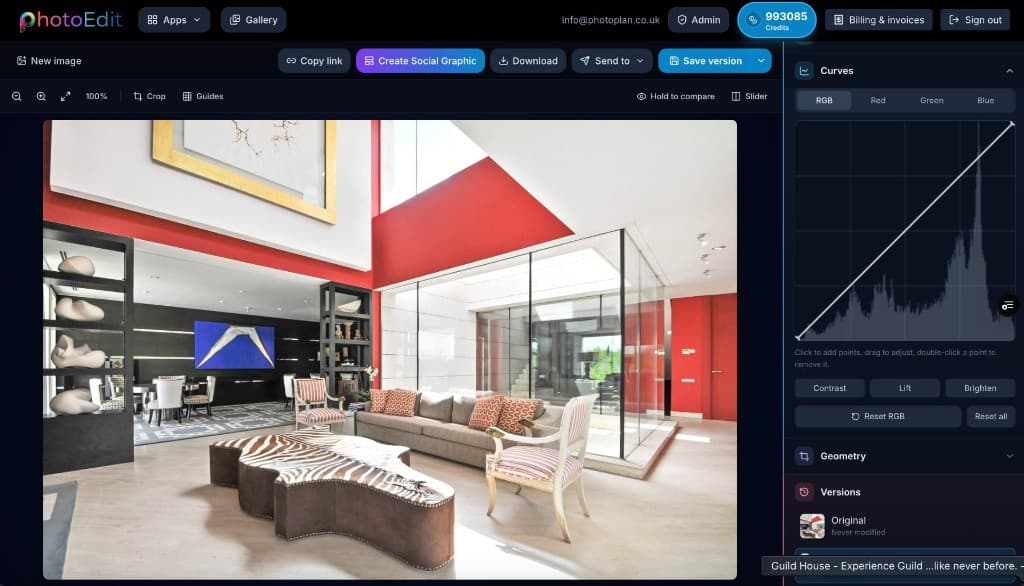
The free PhotoEdit Studio online photo editor open in a browser

Quick answer

A free online photo editor lets you edit images in your web browser at no cost. PhotoEdit Studio is a free online photo editor built for property marketing — you upload a photo, crop, straighten, brighten and adjust it with simple tools, then download a marketing-ready image, with nothing to install.

Key takeaways

  • PhotoEdit Studio is free to use in any modern web browser.
  • There is nothing to download, install or licence.
  • Tools include crop, straighten, exposure, colour and export.
  • It is designed for property photos and non-designers.
  • Optional ReHub AI upgrades may use credits.

Is there a genuinely free online photo editor?

Yes. PhotoEdit Studio offers a free browser-based editor with cropping, straightening, exposure, colour and export included. Optional advanced AI tools may use ReHub credits, but everyday editing is free.

Do I need to download anything?

No. PhotoEdit Studio runs in your browser, so there is no software to download or install. Open the editor, upload a photo and start editing on any computer.

What can I edit for free?

You can crop, straighten, resize and adjust exposure, contrast, brightness, saturation, shadows and highlights, then export a clean, marketing-ready image — all at no cost.

Do I need to sign up or create an account?

No. You can open the free online photo editor and start editing straight away. An account is only needed for optional extras like saving projects or using credit-powered AI tools.

Can I use the free photo editor on my phone?

Yes. Because PhotoEdit Studio runs in the browser, you can edit photos online from a phone, tablet or computer — no app to install.

Is it better than other free online photo editors?

For property, yes. General free editors are built for everything; PhotoEdit Studio focuses on the edits listing photos need — straightening, brightening and cropping — so it is faster and simpler for property marketing.

What is a free online photo editor?

A free online photo editor is a tool that lets you edit images directly in your web browser, without paying for software or installing anything on your computer. You open a website, upload a photo, make your changes and download the result.

PhotoEdit Studio is a free online photo editor built specifically for property marketing. Instead of the overwhelming feature set of professional design software, it gives you exactly the tools property photos need — cropping, straightening, exposure, contrast, brightness, colour, shadows and highlights — in a clean, simple interface.

Because it runs in the browser, you can edit from any computer with an internet connection. There is no licence to manage, no updates to install and no design experience required. It is built to help property images look more professional with the minimum of fuss.

Step-by-step

How it works

From a property photo to a cleaner, marketing-ready image — in three simple steps.

  1. 1

    Upload your property photo

    Drag and drop, browse or paste an image straight into your browser. JPG, PNG and WEBP are all supported — no account or install needed to start.

  2. 2

    Crop, straighten and adjust

    Level the horizon, reframe the shot and fine-tune exposure, contrast, brightness and colour with simple sliders designed for non-designers.

  3. 3

    Download a marketing-ready image

    Export a cleaner, brighter, well-composed photo ready for portals, brochures and social — or send it straight to other ReHub tools.

Why it works

Why use a free online photo editor

Free and browser-based

No download, no licence and no trial limits — open a tab and start editing property photos straight away.

Fast, simple tools

Crop, straighten, brighten and adjust with simple sliders designed for people who are not designers.

Tuned for property

Tools that handle the things property photos need: bright windows, dark corners and crooked verticals.

Marketing-ready output

Export clean, well-composed images ideal for quick marketing-ready edits across portals, brochures and social.

Example use cases

Where to use it

Real ways property professionals put this to work every day.

Quick listing fixes

Straighten and brighten a photo before it goes live.

On any device

Edit from any computer with a browser — nothing to install.

Non-designers

Simple sliders for anyone in a property team.

Marketing-ready export

Download clean images for portals and social.

How to edit a photo online for free

The workflow is deliberately simple so anyone can use it.

What to look for in a free online photo editor

Not every free online photo editor is built for the same job. Many are general-purpose tools loaded with filters and stickers; few are tuned for the specific demands of property photography. When choosing one for listings, look for the essentials that actually move the needle:

Is a free online photo editor safe to use?

With PhotoEdit Studio, your edits happen in your browser session and your original image is never modified — you always keep the untouched file and decide where the finished image is saved. There is no software to install, so there is nothing to update or patch on your computer.

For everyday property marketing this makes a free online editor both convenient and low-risk: open a tab, improve a photo, download it, done.

When free browser editing is enough

For the majority of day-to-day property marketing tasks, a free online photo editor is all you need. Most listing photos simply need to be straightened, brightened and cropped to look noticeably more professional. PhotoEdit Studio handles all of that without the cost or complexity of desktop software.

When an image needs more — removing clutter, staging an empty room, converting a daytime shot to dusk or animating it into video — you can send it to the credit-powered AI tools in the wider ReHub Studio ecosystem.

Compare

Free online photo editor vs desktop software

FactorPhotoEdit Studio (free, online)Desktop software
PriceFreePaid licence or subscription
InstallNone — runs in browserDownload and updates
Sign-upNot required to startAccount and licence
Learning curveMinutesHours to weeks
Works onAny device with a browserInstalled machine only
Best forQuick property editsAdvanced retouching

FAQs

Frequently asked questions

9 answers to the questions property professionals ask most.

Yes. The core editor — cropping, straightening, exposure, colour and export — is free to use in your browser. Optional advanced AI tools may use ReHub credits depending on the feature.

Try the free online photo editor

Upload a property photo and crop, straighten and brighten it into a clean, marketing-ready image in minutes — free, in your browser, no sign-up required.

Free to use · No download · No design skills needed