
PhotoEdit Studio

Real estate photo editor

A free real estate photo editor

Prepare listing photos that look clean and professional. PhotoEdit Studio is a free real estate photo editor for cropping, straightening, brightening and enhancing interiors and exteriors online.

Free to use · No download · No design skills needed

photoedit.studio
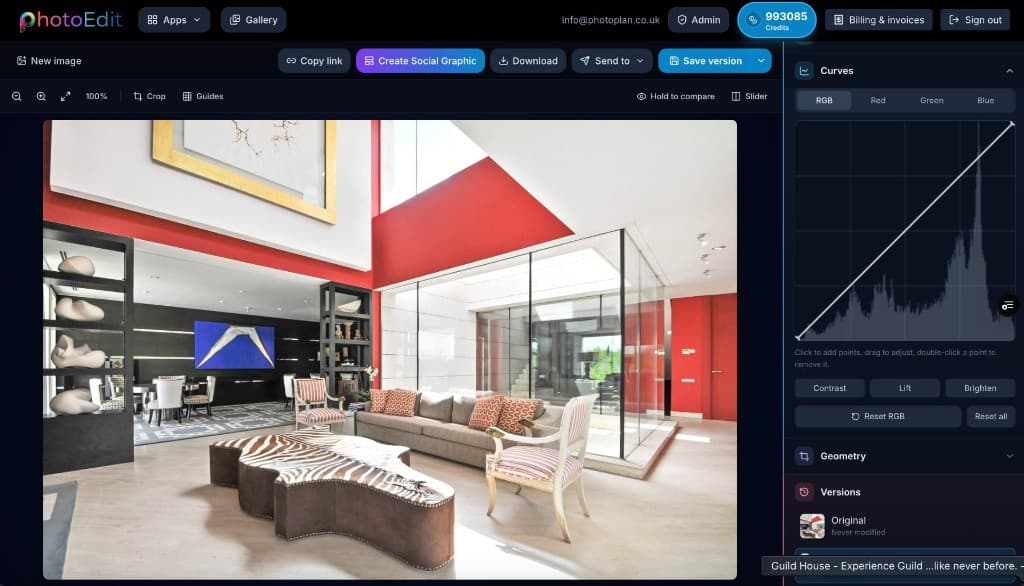
A listing photo open in the PhotoEdit Studio real estate photo editor

Quick answer

A real estate photo editor is software for improving listing photographs. PhotoEdit Studio is a free, browser-based real estate photo editor that lets agents and photographers crop, straighten, brighten and balance interior and exterior shots, helping every listing present a cleaner, more professional first impression.

Key takeaways

  • A free real estate photo editor that runs in the browser.
  • Crop, straighten, brighten and balance listing photos.
  • Designed for the way real estate photos need to look.
  • No Photoshop, no download and no design skills required.
  • Part of the ReHub Studio property media ecosystem.

What is the best free real estate photo editor?

PhotoEdit Studio is built specifically for real estate, with simple browser-based tools for cropping, straightening and brightening listing photos — making it ideal for fast, marketing-ready edits without expensive software.

How do real estate agents edit photos?

Most agents straighten, brighten and crop their listing photos. PhotoEdit Studio handles all three in the browser for free, plus exposure, contrast and colour for a balanced, professional result.

Do I need editing experience?

No. The editor is designed for non-designers, with simple sliders and one-tap tools, so any agent or assistant can produce cleaner listing photos quickly.

What is a real estate photo editor?

A real estate photo editor is a tool for improving the photographs used to market property. Listing photos have specific demands: rooms must look level and bright, windows must keep their detail and exteriors must look sharp and inviting.

PhotoEdit Studio is a free real estate photo editor that focuses on exactly these tasks. It strips away the complexity of professional design software and gives agents, photographers and marketing teams the tools that matter for listings, in a clean browser interface.

Because it is free and browser-based, every listing can get a quick, consistent edit — straightened, brightened and well-composed — helping your whole portfolio present a more professional first impression.

Step-by-step

How it works

From a property photo to a cleaner, marketing-ready image — in three simple steps.

  1. 1

    Upload your property photo

    Drag and drop, browse or paste an image straight into your browser. JPG, PNG and WEBP are all supported — no account or install needed to start.

  2. 2

    Crop, straighten and adjust

    Level the horizon, reframe the shot and fine-tune exposure, contrast, brightness and colour with simple sliders designed for non-designers.

  3. 3

    Download a marketing-ready image

    Export a cleaner, brighter, well-composed photo ready for portals, brochures and social — or send it straight to other ReHub tools.

For real estate

Why use a real estate photo editor

Free and browser-based

No download, no licence and no trial limits — open a tab and start editing property photos straight away.

Fast, simple tools

Crop, straighten, brighten and adjust with simple sliders designed for people who are not designers.

Tuned for property

Tools that handle the things property photos need: bright windows, dark corners and crooked verticals.

Marketing-ready output

Export clean, well-composed images ideal for quick marketing-ready edits across portals, brochures and social.

Example use cases

Where to use it

Real ways property professionals put this to work every day.

New listings

Edit every photo before a property goes live.

Portfolio refresh

Re-edit tired photos to re-energise a listing.

Vendor reports

Present cleaner imagery in marketing updates.

Social media

Resize and brighten photos for property feeds.

How to edit real estate photos

A consistent editing routine keeps every listing looking professional.

Honest, professional listing photos

Editing should make a property look its best while still reflecting reality. PhotoEdit Studio is designed for natural improvements — straightening, brightening and balancing — that help create a cleaner first impression without misrepresenting the property. Always present edited photos honestly so they reflect the real home.

Compare

PhotoEdit Studio vs traditional editing software

FactorPhotoEdit StudioDesktop software
CostFree to usePaid licence or subscription
InstallNone — runs in browserDownload and updates
Learning curveMinutesHours to weeks
FocusBuilt for propertyGeneral-purpose
Best forQuick listing editsAdvanced retouching

FAQs

Frequently asked questions

5 answers to the questions property professionals ask most.

Yes. The core editing tools are free in the browser. Optional AI tools from ReHub Studio may use credits.

Start editing your property photos for free

Upload a photo and crop, straighten and brighten it into a cleaner, marketing-ready image in minutes. Free to use, no download and no design skills required.

Free to use · No download · No design skills needed