Do I need Photoshop to edit property photos?
No. For cropping, straightening, brightening and adjusting listing photos, PhotoEdit Studio is free and faster. Photoshop is only needed for advanced retouching or compositing.

PhotoEdit vs Photoshop
For everyday property edits, you may not need Photoshop at all. Here is how PhotoEdit Studio compares — free, fast, browser-based property editing versus powerful but complex professional software.
Free account · No card · Manual editing is free
Quick answer
For everyday property marketing edits — cropping, straightening, brightening and adjusting — you do not need Photoshop. PhotoEdit Studio is free, browser-based and far simpler, making it faster for listing photos. Photoshop remains more powerful for advanced retouching and compositing, but is paid, complex and slower for quick tasks.
No. For cropping, straightening, brightening and adjusting listing photos, PhotoEdit Studio is free and faster. Photoshop is only needed for advanced retouching or compositing.
For property marketing, yes. It covers the edits most listings need in a simple, free, browser-based tool, without the cost and complexity of Photoshop.
Use Photoshop for advanced object removal, compositing, detailed retouching and complex masking. For quick, marketing-ready property edits, PhotoEdit Studio is the faster choice.
Photoshop is the industry standard for image editing, and it is enormously powerful. But that power comes with a subscription cost, a steep learning curve and a heavyweight desktop application — none of which most property professionals need for a quick listing edit.
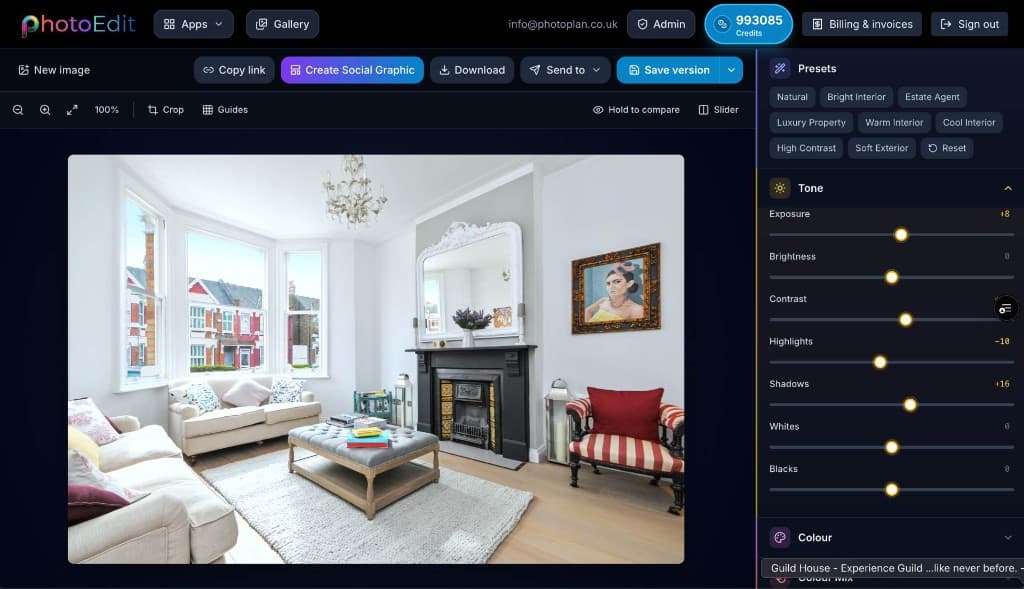
PhotoEdit Studio takes the opposite approach. It is free, runs in the browser and focuses only on the edits property photos actually need: crop, straighten, exposure, contrast, brightness, saturation, shadows and highlights. There is nothing to install and almost nothing to learn.
The honest answer is that the two tools serve different jobs. For advanced retouching and compositing, Photoshop wins. For fast, marketing-ready property edits, PhotoEdit Studio is simpler, quicker and free.
Step-by-step
From a free PhotoEdit account to a downloaded, marketing-ready image.
Sign in or register with email or Google. No card is required. The same ReHub login works across PhotoEdit and the other ReHub apps.
Drag and drop, browse or paste an image straight into the editor. JPG, PNG and WEBP are all supported — nothing to install.
Level the horizon, reframe the shot and fine-tune exposure, contrast, brightness and colour with simple sliders designed for non-designers.
Export a cleaner, well-composed photo for your portal, brochure or social post. Optional PhotoClear tools in the same editor may use credits.
Why choose PhotoEdit
No subscription — the core editor costs nothing to use.
Runs in the browser, so there is no download or setup.
Quick crops and straightens take seconds, not a full session.
Simple sliders and one-tap tools for non-designers.
Example use cases
Real ways property professionals put this to work every day.
Crop, straighten and brighten in seconds.
Anyone in a property team can use it.
No install, so it works everywhere.
Keep Photoshop for compositing and masking.
Choose PhotoEdit Studio when you need a clean, marketing-ready property photo quickly and for free. Choose Photoshop when you need pixel-level retouching, compositing or complex masking. Many property professionals use both — PhotoEdit for the everyday and Photoshop for the occasional deep edit.
Compare
| Factor | PhotoEdit Studio | Photoshop |
|---|---|---|
| Price | Free | Monthly subscription |
| Install | None — in browser | Desktop download |
| Learning curve | Minutes | Steep |
| Speed for quick edits | Seconds | Slower |
| Advanced retouching | Limited | Extensive |
| Best for | Property marketing | Pro design work |
FAQs
5 answers to the questions property professionals ask most.
Explore further
Create a free account, upload a photo and crop, straighten and brighten it into a cleaner, marketing-ready image. Manual editing is free — no card and no download.
Free account · No card · Manual editing is free