Is PhotoEdit Studio a Lightroom alternative?
For quick property edits, yes. It crops, straightens, brightens and adjusts photos for free in the browser. Lightroom remains more powerful for RAW processing and cataloguing.

PhotoEdit vs Lightroom
Lightroom is built for serious photographers and RAW workflows. PhotoEdit Studio is built for fast, free, marketing-ready property edits in the browser. Here is how they compare.
Free account · No card · Manual editing is free
Quick answer
PhotoEdit Studio and Lightroom suit different needs. Lightroom is a paid professional tool for RAW processing, cataloguing and batch editing. PhotoEdit Studio is free, browser-based and built for quick, marketing-ready property edits. For fast crops, straightens and brightness, PhotoEdit is simpler; for RAW workflows, Lightroom is more powerful.
For quick property edits, yes. It crops, straightens, brightens and adjusts photos for free in the browser. Lightroom remains more powerful for RAW processing and cataloguing.
Use Lightroom for RAW files, large catalogues, batch presets and detailed tonal control. Use PhotoEdit Studio for fast, free, marketing-ready edits.
Yes. Many use Lightroom for their core workflow and PhotoEdit Studio for quick fixes, client previews and on-the-go edits.
Lightroom is a professional photographer’s tool. It is superb at RAW processing, organising large photo libraries, applying presets across batches and giving fine tonal control. But it is a paid subscription, it lives on the desktop and it is more than most property professionals need for a quick edit.
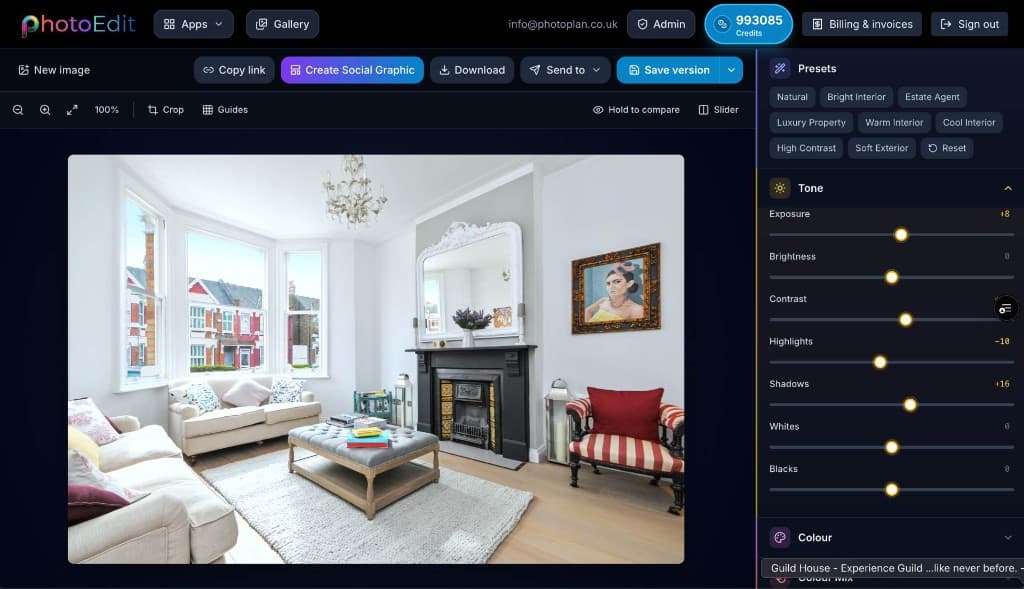
PhotoEdit Studio is built for speed and simplicity. It runs in the browser, costs nothing and focuses on the edits property photos need — crop, straighten, exposure, contrast, brightness, saturation, shadows and highlights — with instant feedback and no catalogue to manage.
For a property photographer’s full workflow, Lightroom is hard to beat. For an estate agent or marketer who just needs a clean, bright, level photo fast, PhotoEdit Studio is the simpler, free choice — and the two sit happily side by side.
Step-by-step
From a free PhotoEdit account to a downloaded, marketing-ready image.
Sign in or register with email or Google. No card is required. The same ReHub login works across PhotoEdit and the other ReHub apps.
Drag and drop, browse or paste an image straight into the editor. JPG, PNG and WEBP are all supported — nothing to install.
Level the horizon, reframe the shot and fine-tune exposure, contrast, brightness and colour with simple sliders designed for non-designers.
Export a cleaner, well-composed photo for your portal, brochure or social post. Optional PhotoClear tools in the same editor may use credits.
Why choose PhotoEdit
The core editor costs nothing to use.
No import, catalogue or render — just open and edit.
Simple sliders for anyone, not just photographers.
Share a clean edit in seconds before a full retouch.
Example use cases
Real ways property professionals put this to work every day.
Crop, straighten and brighten in seconds.
Share a clean preview before the full edit.
Edit from any device with a browser.
Keep Lightroom for RAW and cataloguing.
Pick the tool that fits the task. For RAW files, big catalogues and precise tonal work, Lightroom is the professional standard. For fast, free, marketing-ready property edits, PhotoEdit Studio is simpler and quicker — and the two complement each other well.
Compare
| Factor | PhotoEdit Studio | Lightroom |
|---|---|---|
| Price | Free | Subscription |
| Install | None — in browser | Desktop / app |
| RAW processing | Not the focus | Excellent |
| Cataloguing | No | Yes |
| Speed for quick edits | Seconds | Slower |
| Best for | Marketing edits | Pro workflows |
FAQs
5 answers to the questions property professionals ask most.
Explore further
Create a free account, upload a photo and crop, straighten and brighten it into a cleaner, marketing-ready image. Manual editing is free — no card and no download.
Free account · No card · Manual editing is free