
PhotoEdit Studio

For drone photographers

Spotlight for drone photographers

Turn wide aerial frames into clear marketing images. Draw around the plot, building or garden and fade everything outside — free in PhotoEdit, no account required.

Free in PhotoEdit · Your image stays on your device

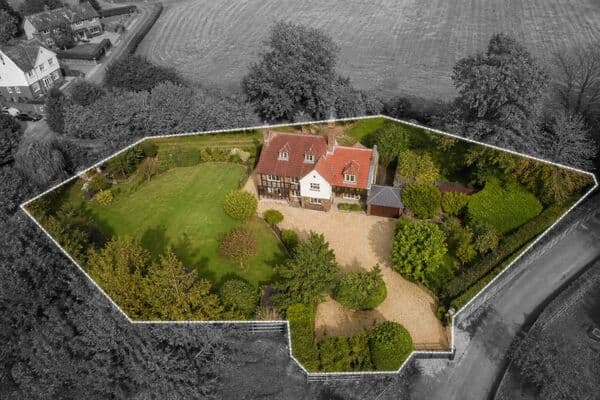
Aerial property photo with the house and garden highlighted in colour and surroundings in black and whiteFree Spotlight tool

Quick answer

Drone photographers use PhotoEdit Spotlight to highlight a property, plot or garden in aerial photos. Draw a boundary around the subject and fade, darken, blur or convert everything outside to black and white — free in the browser, with no Photoshop, account or upload required.

Key takeaways

  • Spotlight is the go-to tool for aerial listing photos.
  • Draw around a plot, building or garden in seconds.
  • Fade surroundings with Classic, Focus, Dark or Blur.
  • Runs locally in the browser — your image stays private.
  • Free to use, with the full PhotoEdit editor when you need crops and colour.

How do drone photographers highlight a property in an aerial photo?

Use Spotlight: upload the drone frame, draw around the house, plot or garden, then choose an effect that fades everything outside the selection. Export a clean JPG, PNG or WebP ready for portals and brochures.

Do I need Photoshop for aerial property marketing images?

No. Spotlight handles the common aerial marketing edit — keeping the subject clear while the neighbourhood falls back — free in the browser without layers, masks or desktop software.

Is Spotlight free for drone photographers?

Yes. Spotlight is free in PhotoEdit Studio. Your image is processed locally on your device, with no account required to start.

Aerial frames that show the right plot

Drone photography sells context — the house in its street, the garden against the fields, the development in the landscape. Buyers still need to know which plot is for sale. A wide colour frame alone often leaves that unclear.

Spotlight is built for that moment. Draw a simple boundary around the property and garden, then fade everything outside with Classic black and white, Focus, Brochure outline, Dark or Blur. The subject stays sharp; the surroundings step back.

It runs free in PhotoEdit, locally in the browser. When you also need crop, straighten or tone work, the full editor is one click away — but for aerial marketing packs, Spotlight is the main tool.

Step-by-step

How it works

From a wide aerial frame to a clear, plot-focused marketing image — in three steps.

  1. 1

    Upload your drone photo

    Drop in an aerial JPG, PNG or WEBP. Processing stays on your device — nothing is uploaded to a server.

  2. 2

    Draw around the subject

    Trace the plot, building or garden with a simple polygon. Adjust points until the selection is clean.

  3. 3

    Apply an effect and download

    Choose Classic, Focus, Brochure, Dark or Blur, then export a marketing-ready image at full resolution.

Spotlight first

Why drone photographers lead with Spotlight

The tool that turns neighbourhood context into a clear “this one” signal for listings and brochures.

Highlight the plot instantly

Keep the house and garden in full colour while streets, fields and neighbours fade back.

Built for aerial frames

Wide drone shots are exactly where Spotlight shines — portals, brochures and auction packs.

Private by design

Everything runs locally in the browser. No upload, no AI processing, no remote storage.

Client-ready in seconds

Deliver a polished aerial highlight between shoots without opening desktop software.

Example use cases

Where to use it

Real ways property professionals put this to work every day.

Residential listings

Show which house and garden are for sale from above.

Land and plots

Outline a development site or paddock for sales packs.

Brochure covers

Add a clean outline or fade for print-ready aerials.

Commercial sites

Call out a building or yard in a busy industrial frame.

Make Spotlight the default aerial deliverable

Many agents and developers now expect a “spotlight” aerial as standard — subject clear, context soft. Offer it as a quick add-on or include it in every pack without adding hours of desktop work.

Pair with the full PhotoEdit editor

Need a crop, straighten or exposure tweak before or after Spotlight? The free PhotoEdit editor handles everyday property adjustments in the same browser. For staging, decluttering or day-to-dusk, hand off to ReHub AI tools when a client wants more.

Compare

Spotlight vs desktop masking

FactorSpotlightPhotoshop / desktop
Time to resultSeconds in browserLayers and masks
Learning curveDraw and downloadPen tool / selections
CostFreeSubscription
PrivacyStays on your deviceLocal files, heavy app
Best forAerial highlightsComplex retouch

FAQs

Frequently asked questions

5 answers to the questions property professionals ask most.

Spotlight is a free PhotoEdit tool that lets you draw around a property or area in an aerial photo and fade everything outside the selection — ideal for making the correct plot obvious in marketing images.

Highlight your next aerial in Spotlight

Upload a drone photo, draw around the plot and download a clear, marketing-ready image in seconds. Free, local and built for property.

Free in PhotoEdit · Your image stays on your device